
十分钟开发一个智能天气助手
一、项目概述
1.1 项目目标
构建一个轻量级智能天气助手 Agent,具备以下核心能力:
- 自然语言理解:解析用户自然语言查询(如"上海今天需要带伞吗?")
- 实时天气查询:自动调用天气 API 获取实时天气数据
- 智能生活建议:根据天气状况提供穿衣、出行等生活建议
- 多轮对话支持:记住用户上下文,支持连续对话
1.2 技术选型理由
为什么选择 Spring AI Alibaba?
- Java 生态无缝集成:Spring AI Alibaba 是 Spring 官方 AI 框架在阿里云生态的具体实现,让 Java 开发者用熟悉的 Spring 编程模型构建 AI 应用
- Function Calling 能力:支持函数调用,让大模型能够自动调用外部 API(如天气查询)
- 企业级特性:内置重试、监控、缓存等生产环境必需能力
- 通义千问深度适配:针对阿里云通义千问模型优化,中文理解能力强
- 快速开发:通过 ChatClient 高阶 API,10 行代码即可完成基础对话功能
1.3 项目完整代码及介绍
详见:https://github.com/wangdoyos/WeatherAgent
二、技术栈
| 技术 | 版本要求 | 说明 |
|---|---|---|
| JDK | 17+ | Spring Boot 3.x 要求 |
| Spring Boot | 3.2+ | 基础框架 |
| Spring AI Alibaba | 1.1.2.1+ | AI 集成框架 |
| Maven | 3.6+ | 构建工具 |
| 阿里云通义千问 API | - | 大模型服务 |
| 第三方天气 API | 和风天气 API | 实时天气数据源 |
三、实现方案设计
3.1 系统架构
用户自然语言查询
       ↓
   Controller 层
       ↓
   ChatClient(Spring AI Alibaba)
       ↓
   意图识别与参数提取
       ↓
   ├─→ Function Calling 触发
   │      ↓
   │   WeatherService(@Tool)
   │      ↓
   │   第三方天气 API
   │      ↓
   └─→ 通义千问大模型
          ↓
      智能建议生成
          ↓
      返回用户
3.2 核心流程
- 用户输入:"上海今天需要带伞吗?"
- 意图识别:ChatClient 分析用户意图,识别需要查询天气
- 函数调用:触发
getWeather函数,提取城市"上海"和日期"今天" - API 调用:WeatherService 调用和风天气 API
- 数据获取:获取上海实时天气(温度、湿度、降水概率等)
- 智能生成:通义千问基于天气数据生成生活建议
- 响应返回:"上海今天多云转阴,降水概率30%,建议携带雨具,温度25°C..."
四、详细实现步骤
4.1 环境准备与项目初始化
4.1.1 创建 Spring Boot 项目
# 使用 Spring Initializr 创建项目
# 选择:Spring Boot 3.2.5+,Java 17+
# 添加依赖:Spring Web
4.1.2 添加 Maven 依赖
<dependencies>
    <!-- Spring AI Alibaba 核心依赖 -->
    <dependency>
        <groupId>com.alibaba.cloud.ai</groupId>
        <artifactId>spring-ai-alibaba-starter-dashscope</artifactId>
        <version>1.1.2.1</version>
    </dependency>

    <!-- Web 依赖 -->
    <dependency>
        <groupId>org.springframework.boot</groupId>
        <artifactId>spring-boot-starter-web</artifactId>
    </dependency>

    <!-- Lombok(简化代码) -->
    <dependency>
        <groupId>org.projectlombok</groupId>
        <artifactId>lombok</artifactId>
        <optional>true</optional>
    </dependency>

    <!-- HTTP 客户端(调用天气 API) -->
    <dependency>
        <groupId>org.springframework.boot</groupId>
        <artifactId>spring-boot-starter-webflux</artifactId>
    </dependency>


    <!-- FastJSON(JSON 处理) -->
    <dependency>
        <groupId>com.alibaba.fastjson2</groupId>
        <artifactId>fastjson2</artifactId>
        <version>2.0.61</version>
        <scope>compile</scope>
    </dependency>
</dependencies>

<!-- 仓库配置(解决依赖下载问题) -->
<repositories>
    <repository>
        <id>aliyun-maven</id>
        <url>https://maven.aliyun.com/repository/public</url>
    </repository>
    <repository>
        <id>spring-milestones</id>
        <url>https://repo.spring.io/milestone</url>
    </repository>
</repositories>
4.1.3 配置 application.yml
spring:
  application:
    name: weather-agent

  # Spring AI Alibaba 配置
  ai:
    dashscope:
      # 阿里云百炼平台 API Key
      api-key: 替换为自己的API Key
      chat:
        options:
          # 使用通义千问 Plus 模型(平衡性能与成本)
          model: qwen-plus
          temperature: 0.7
          max-tokens: 500
          # 开启函数调用
          function-callback-enabled: true

  # 缓存配置(降低 API 调用成本)
  cache:
    type: simple
    cache-names: weather-cache

server:
  port: 8080

# 天气 API 配置
weather:
  api:
    key: 替换为自己和风天气的API Key
    base-url: https://mc67cetrd5.re.qweatherapi.com/v7
4.2. 实现天气查询服务
4.2.1 定义数据模型
package com.weather.agent.model;

import com.fasterxml.jackson.annotation.JsonProperty;
import com.fasterxml.jackson.annotation.JsonPropertyDescription;
import lombok.Data;

/**
 * 天气查询请求参数
 */
@Data
public class WeatherRequest {

    @JsonProperty("city")
    @JsonPropertyDescription("城市名称,如北京、上海、杭州")
    private String city;

    @JsonProperty("date")
    @JsonPropertyDescription("查询日期,如今天、明天、具体日期2024-08-22")
    private String date;
}
package com.weather.agent.model;
import lombok.AllArgsConstructor;
import lombok.Data;
import lombok.NoArgsConstructor;
/**
* 天气响应数据(来自第三方 API)
*/
@Data
@NoArgsConstructor
@AllArgsConstructor
public class WeatherResponse {
/**
* 城市
*/
private String city;
/**
* 日期
*/
private String date;
/**
* 天气状况:晴、多云、小雨等
*/
private String condition;
/**
* 温度(摄氏度)
*/
private String temperature;
/**
* 湿度(百分比)
*/
private String humidity;
/**
* 降水概率(百分比)
*/
private String precipitation;
/**
* 风速(km/h)
*/
private String windSpeed;
/**
* 能见度(km)
*/
private String visibility;
}4.2.2 实现天气服务
package com.weather.agent.service;

import com.alibaba.fastjson2.JSON;
import com.weather.agent.model.WeatherResponse;
import lombok.extern.slf4j.Slf4j;
import org.springframework.ai.tool.annotation.Tool;
import org.springframework.ai.tool.annotation.ToolParam;
import org.springframework.beans.factory.annotation.Value;
import org.springframework.stereotype.Service;
import org.springframework.web.reactive.function.client.WebClient;
import reactor.core.publisher.Mono;

import java.time.LocalDate;
import java.time.format.DateTimeFormatter;
import java.util.HashMap;
import java.util.Map;

/**
 * 天气查询服务(调用和风天气 API)
 */
@Slf4j
@Service
public class WeatherService {

    private final WebClient webClient;

    @Value("${weather.api.key}")
    private String apiKey;

    public WeatherService(
            WebClient.Builder webClientBuilder,
            @Value("${weather.api.base-url}") String baseUrl) {
        this.webClient = webClientBuilder.baseUrl(baseUrl).build();
    }

    /**
     * 查询指定城市的天气
     * 使用 @Tool 注解标记为 AI 可调用的函数
     */
    @Tool(
            name = "getWeather",
            description = "查询指定城市在特定日期的天气状况,包括温度、湿度、降水概率等信息。当用户询问天气、气温、气候、是否需要带伞等问题时调用此函数。"
    )
    public WeatherResponse getWeather(
            @ToolParam(description = "城市名称,如北京、上海、杭州") String city,
            @ToolParam(description = "查询日期,如今天、明天、具体日期2024-08-22") String date
    ) {
        log.info("查询天气: 城市={}, 日期={}", city, date);

        try {
            // 1. 解析日期
            String queryDate = parseDate(date);

            // 2. 获取城市 ID(简化版,实际需要调用城市搜索 API)
            String cityId = getCityId(city);
            if (cityId == null) {
                log.warn("未找到城市: {}", city);
                return createErrorResponse(city, date, "未找到该城市");
            }

            // 3. 调用和风天气 API
            WeatherResponse response = callWeatherApi(cityId, queryDate);
            if (response == null) {
                return createErrorResponse(city, date, "天气数据获取失败");
            }

            log.info("天气查询成功: {}", response);
            return response;

        } catch (Exception e) {
            log.error("天气查询异常", e);
            return createErrorResponse(city, date, "查询异常: " + e.getMessage());
        }
    }

    /**
     * 解析日期(支持"今天"、"明天"、具体日期)
     */
    private String parseDate(String date) {
        if (date == null || date.isEmpty() || "今天".equals(date)) {
            return LocalDate.now().format(DateTimeFormatter.ofPattern("yyyy-MM-dd"));
        } else if ("明天".equals(date)) {
            return LocalDate.now().plusDays(1).format(DateTimeFormatter.ofPattern("yyyy-MM-dd"));
        } else {
            // 尝试解析具体日期
            try {
                return LocalDate.parse(date).format(DateTimeFormatter.ofPattern("yyyy-MM-dd"));
            } catch (Exception e) {
                return LocalDate.now().format(DateTimeFormatter.ofPattern("yyyy-MM-dd"));
            }
        }
    }

    /**
     * 获取城市 ID(简化版,实际需要调用城市搜索 API)
     */
    private String getCityId(String cityName) {
        // 简化映射,实际应该调用API,文档: https://dev.qweather.com/docs/api/geoapi/city-lookup/
        Map<String, String> cityMap = new HashMap<>();
        cityMap.put("北京", "101010100");
        cityMap.put("上海", "101020100");
        cityMap.put("杭州", "101210101");
        cityMap.put("广州", "101280101");
        cityMap.put("深圳", "101280601");

        return cityMap.get(cityName);
    }

    /**
     * 调用和风天气 API
     */
    private WeatherResponse callWeatherApi(String cityId, String date) {
        try {
            // 调用实时天气 API
            // 私有域名通过 Header 传递 API Key
            String url = String.format("/weather/now?location=%s", cityId);

            Mono<WeatherApiResponse> responseMono = webClient
                    .get()
                    .uri(url)
                    .header("X-QW-Api-Key", apiKey)
                    .retrieve()
                    .bodyToMono(WeatherApiResponse.class);

            WeatherApiResponse apiResponse = responseMono.block();

            // 打印 API 响应 JSON
            log.info("和风天气 API 响应: {}", JSON.toJSONString(apiResponse));

            if (apiResponse != null && apiResponse.getCode().equals("200")) {
                WeatherApiResponse.Now now = apiResponse.getNow();
                return new WeatherResponse(
                        apiResponse.getBasic() == null ? null : apiResponse.getBasic().getLocation(),
                        date,
                        now.getText(),
                        now.getTemp(),
                        now.getHumidity(),
                        now.getPrecip(),
                        now.getWindSpeed(),
                        now.getVis()
                );
            }

            return null;

        } catch (Exception e) {
            log.error("调用天气 API 失败", e);
            return null;
        }
    }

    /**
     * 创建错误响应
     */
    private WeatherResponse createErrorResponse(String city, String date, String error) {
        return new WeatherResponse(city, date, "未知", "0", "0", "0", "0", "0");
    }

    /**
     * 和风天气 API 响应结构
     */
    @lombok.Data
    static class WeatherApiResponse {
        private String code;
        private Basic basic;
        private Now now;

        @lombok.Data
        static class Basic {
            private String location;
        }

        @lombok.Data
        static class Now {
            // 天气状况
            private String text;
            // 温度
            private String temp;
            // 湿度
            private String humidity;
            // 降水
            private String precip;
            // 风速
            @com.fasterxml.jackson.annotation.JsonProperty("windSpeed")
            private String windSpeed;
            // 能见度
            private String vis;
        }
    }
}
4.3 配置 ChatClient 与函数注册
package com.weather.agent.config;

import com.weather.agent.service.WeatherService;
import lombok.extern.slf4j.Slf4j;
import org.springframework.ai.chat.client.ChatClient;
import org.springframework.ai.chat.client.advisor.MessageChatMemoryAdvisor;
import org.springframework.ai.chat.client.advisor.SimpleLoggerAdvisor;
import org.springframework.ai.chat.memory.ChatMemory;
import org.springframework.ai.chat.memory.MessageWindowChatMemory;
import org.springframework.ai.tool.method.MethodToolCallbackProvider;
import org.springframework.context.annotation.Bean;
import org.springframework.context.annotation.Configuration;

/**
 * AI 配置类
 */
@Slf4j
@Configuration
public class AiConfig {

    /**
     * 配置 ChatClient
     */
    @Bean
    public ChatClient chatClient(ChatClient.Builder builder, WeatherService weatherService) {
        log.info("初始化 ChatClient...");

        return builder
                // 设置系统提示词
                .defaultSystem("""
                        你是一个专业的天气助手,擅长根据天气情况为用户提供生活建议。

                        你的主要职责:
                        1. 根据用户查询的城市和日期,获取准确的天气信息
                        2. 分析天气数据,提供实用的生活建议(穿衣、出行、健康等)
                        3. 回答要简洁、准确、友好,语言自然流畅

                        回答风格:
                        - 使用第二人称,语气亲切
                        - 建议要具体可操作
                        - 遇到数据异常时,主动提示用户重试
                        """)

                // 注册天气查询工具(Function Calling)
                .defaultToolCallbacks(MethodToolCallbackProvider.builder().toolObjects(weatherService).build())

                // 添加对话记忆(支持多轮对话)
                .defaultAdvisors(
                        MessageChatMemoryAdvisor.builder(chatMemory()).build(),
                        new SimpleLoggerAdvisor()
                )

                .build();
    }

    /**
     * 配置 Chat Memory ,分布式场景需要持久化可以自定义 ChatMemory 实现
     */
    @Bean
    public ChatMemory chatMemory() {
        // 使用内存存储(简单场景)
        return MessageWindowChatMemory.builder()
                // 保留最近100条消息
                .maxMessages(100)
                .build();
    }
}
4.4 实现 Controller 层
天气助手控制器
package com.weather.agent.controller;

import lombok.RequiredArgsConstructor;
import lombok.extern.slf4j.Slf4j;
import org.springframework.ai.chat.client.ChatClient;
import org.springframework.http.MediaType;
import org.springframework.web.bind.annotation.*;
import reactor.core.publisher.Flux;

/**
 * 天气助手控制器
 */
@Slf4j
@RestController
@RequestMapping("/api/weather")
@RequiredArgsConstructor
public class WeatherAssistantController {

    private final ChatClient chatClient;

    /**
     * 聊天接口(支持自然语言查询)
     *
     * 示例:
     * - 上海今天需要带伞吗?
     * - 明天北京天气怎么样?
     * - 杭州今天穿什么衣服合适?
     */
    @PostMapping("/chat")
    public String chat(@RequestBody ChatRequest request) {
        log.info("收到用户查询: {}", request.getMessage());

        try {
            // 链式调用 ChatClient
            String response = chatClient
                    .prompt()
                    .user(request.getMessage())
                    .call()
                    .content();

            // 流式响应(打字机效果)
            Flux<String> flux = chatClient.prompt()
                    .user(request.getMessage())
                    .stream()
                    .content();

            log.info("AI 响应: {}", response);
            return response;

        } catch (Exception e) {
            log.error("聊天异常", e);
            return "抱歉,查询过程中出现异常,请稍后重试。错误信息:" + e.getMessage();
        }
    }

    @PostMapping(value = "/chatStream", produces = MediaType.APPLICATION_NDJSON_VALUE)
    public Flux<String> chatStream(@RequestBody ChatRequest request) {
        log.info("收到用户查询: {}", request.getMessage());

        try {
            // 流式响应(打字机效果)
            return chatClient.prompt()
                    .user(request.getMessage())
                    .stream()
                    .content();

        } catch (Exception e) {
            log.error("聊天异常", e);
            return Flux.just("抱歉,查询过程中出现异常,请稍后重试。错误信息:" + e.getMessage());
        }
    }

    /**
     * 简单 GET 接口(快速测试)
     */
    @GetMapping("/ask")
    public String ask(@RequestParam String question) {
        log.info("GET 请求查询: {}", question);
        // 基础调用
        return chatClient.prompt().user(question).call().content();
    }

    /**
     * 聊天请求参数
     */
    @lombok.Data
    public static class ChatRequest {
        private String message;
    }
}
4.5 启动类与测试
4.5.1 应用启动类
package com.weather.agent;

import org.springframework.boot.SpringApplication;
import org.springframework.boot.autoconfigure.SpringBootApplication;

/**
 * 天气助手应用启动类
 */
@SpringBootApplication
public class WeatherAgentApplication {

    public static void main(String[] args) {
        SpringApplication.run(WeatherAgentApplication.class, args);
        System.out.println("========================================");
        System.out.println("🌤️  天气助手 Agent 已启动!");
        System.out.println("访问地址: http://localhost:8080/api/weather/ask?question=上海今天需要带伞吗?");
        System.out.println("========================================");
    }
}
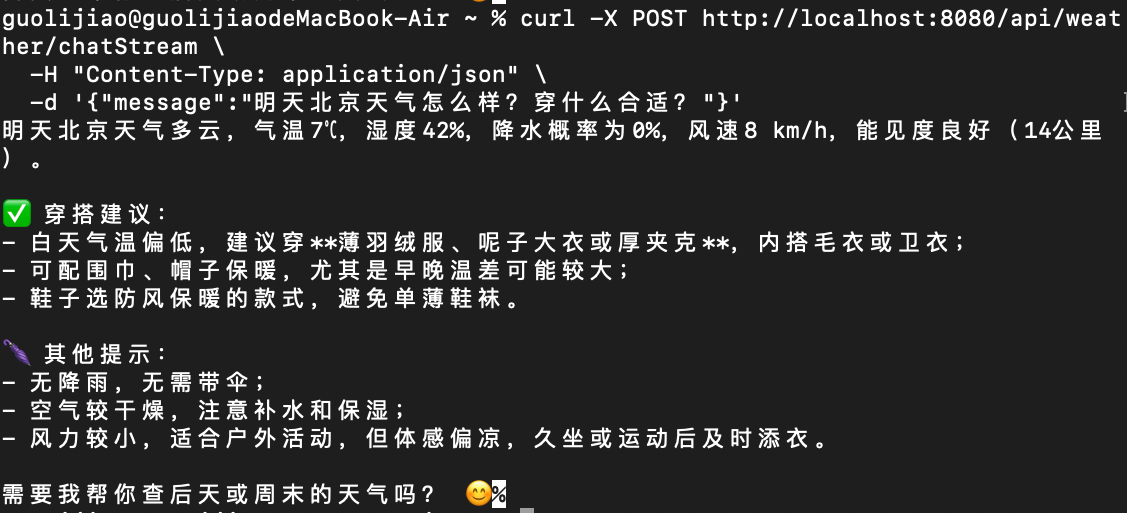
4.5.2 测试接口
# 1. 获取阿里云通义千问 API Key
# 访问:https://bailian.console.aliyun.com/

# 2. 获取和风天气 API Key
# 访问:https://dev.qweather.com/

# 3. 替换yaml配置中的 API Key

# 4. 启动应用
mvn spring-boot:run

# 5. 测试接口
curl "http://localhost:8080/api/weather/ask?question=上海今天需要带伞吗?"

# 6. POST 请求测试
curl -X POST http://localhost:8080/api/weather/chat \
  -H "Content-Type: application/json" \
  -d '{"message":"明天北京天气怎么样?穿什么合适?"}'
4.5.3 输出示例
五、核心知识点
5.1 Function Calling(函数调用)机制
5.1.1 什么是 Function Calling?
Function Calling 是让大模型能够调用外部函数/工具的核心机制。传统的大模型只能回答训练数据中的内容,无法访问实时数据或执行外部操作。Function Calling 打破了这一限制。
5.1.2 工作原理
用户查询 → 大模型分析 → 判断需要调用函数 → 返回函数名和参数
                                                ↓
            应用执行函数 → 获取结果 → 返回给大模型 → 生成最终回答
5.1.3 Spring AI Alibaba 中的实现
- 定义函数:使用
@Tool注解标记方法 - 描述函数:通过
description告诉模型函数的用途 - 参数描述:使用
@ToolParam描述参数含义 - 注册函数:通过
defaultFunctions()或.functions()注册 - 自动调用:模型自动判断何时调用函数
5.1.4 关键注解说明
@Tool(
    name = "getWeather",  // 函数名(可选,默认方法名)
    description = "查询天气,当用户询问天气、气温、是否带伞时调用"  // 关键!帮助模型理解何时调用
)
public WeatherResponse getWeather(
    @ToolParam(description = "城市名称") String city,
    @ToolParam(description = "日期") String date
) {
    // 函数实现
}
5.2 ChatClient 高阶 API
5.2.1 什么是 ChatClient?
ChatClient 是 Spring AI Alibaba 提供的流式(Fluent)API,简化了大模型调用。它是对 ChatModel 的高级封装,支持链式调用。
5.2.2 核心方法
// 基础调用
chatClient.call("问题");

// 链式调用
chatClient.prompt()
    .system("系统提示词")
    .user("用户问题")
    .options(temperature = 0.7)
    .functions("getWeather")
    .call()
    .content();

// 流式响应(打字机效果)
Flux<String> flux = chatClient.prompt()
    .user("问题")
    .stream()
    .content();
5.2.3 ChatOptions 参数配置
| 参数 | 说明 | 推荐值 |
|---|---|---|
| model | 模型选择 | qwen-plus |
| temperature | 生成随机性(0-1) | 0.7(平衡) |
| max-tokens | 最大响应长度 | 500-1000 |
| top-p | 核采样(0-1) | 0.8-0.9 |
5.3 Prompt 工程
5.3.1 System Prompt 设计原则
角色定义 + 职责边界 + 回答风格 + 安全约束5.3.2 示例
// 设置系统提示词
.defaultSystem("""
你是一个专业的天气助手,擅长根据天气情况为用户提供生活建议。

你的主要职责:
1. 根据用户查询的城市和日期,获取准确的天气信息
2. 分析天气数据,提供实用的生活建议(穿衣、出行、健康等)
3. 回答要简洁、准确、友好,语言自然流畅

回答风格:
- 使用第二人称,语气亲切
- 建议要具体可操作
- 遇到数据异常时,主动提示用户重试
""")
5.4 Chat Memory(对话记忆)
5.4.1 为什么需要记忆?
多轮对话中,模型需要记住上下文。例如:
用户:上海今天天气怎么样?
AI:上海今天多云,25°C。
用户:那明天呢?
如果没有记忆,模型无法理解"明天"指的是"上海的明天"。
5.4.2 配置示例
/**
 * 配置 Chat Memory ,分布式场景需要持久化可以自定义 ChatMemory 实现
 */
@Bean
public ChatMemory chatMemory() {
    // 使用内存存储(简单场景)
    return MessageWindowChatMemory.builder()
            // 保留最近100条消息
            .maxMessages(100)
            .build();
}
5.5 企业级特性
5.5.1. 缓存机制(降本90%)
spring:
  ai:
    dashscope:
      chat:
        options:
          cache-mode: SYSTEM_AND_TOOLS  # 缓存系统消息和工具定义
          cache-ttl: 1h                  # 缓存1小时
5.5.2. 重试策略
@Service
public class WeatherService {

    private final WebClient webClient;

    @Retryable(
        retryFor = {
            WebClientRequestException.class,
            TimeoutException.class
        },
        maxAttempts = 3,
        backoff = @Backoff(delay = 1000, multiplier = 2)
    )
    @Tool(description = "查询天气...")
    public WeatherResponse getWeather(String city, String date) {
        // 调用天气 API
        return callWeatherApi(city, date);
    }
}
贡献者

更新日志
2026/3/12 15:21
查看所有更新日志
7177f-于